Accessibility
The PDF looks fine — until compliance review.
PDF/UA tags, alt text and the document title are checked before export. Embedded fonts and the PDF/UA identifier are reported after export, in the compliance report.
Paste your Markdown and check the PDF/UA problems that block an accessible PDF: alt text, heading levels, empty links. Fix them, then export a tagged PDF/UA file.
QUARTERLY REPORT · Q3 2026SAMPLE
Executive summary
We shipped three major features and grew recurring revenue by 18% this quarter, ahead of plan.
Highlights
Built for documents that get reviewed
An accessible PDF carries a tag structure — headings, tables and figures marked so a screen reader can follow them — plus alt text on every figure, a real document title and language, and a reading order that matches the source. Markdown already holds most of that; the export has to carry it through instead of flattening the page.
Check my documentThe last mile
MarkdownGo is built for the step most tools skip: turning a finished draft into a document you can actually send.
PDF/UA tags, alt text and the document title are checked before export. Embedded fonts and the PDF/UA identifier are reported after export, in the compliance report.
Columns collapse, formulas become screenshots, diagrams vanish. One renderer drives both preview and standard PDF, so what you see is what ships; compliance exports may reflow.
Margins, headers, page numbers, cover pages and a real table of contents — configure once and apply the same setup to every export.
Batch-convert a folder, merge finished PDFs, or compile chapters into one book with a single table of contents. Source files stay untouched.
Each conversion runs in its own isolated task directory; saved cloud documents are visible only to the account that created them.
Why MarkdownGo
Most tools stop at a preview. MarkdownGo is built around what happens when the file leaves your hands: structure, fonts, page breaks and a reviewer opening it somewhere else.
Check my documentEditor and page preview share one renderer, so standard PDF exports place headings, tables, code and math exactly where you previewed them. Compliance exports may reflow.
Archive- and accessibility-grade exports with embedded fonts, tagged structure and native compliance identifiers.
Catch missing images, alt text, heading jumps and broken links before the document leaves your desk.
Each conversion runs in its own isolated task directory; saved cloud documents are visible only to the account that created them.
Compliance, not decoration
Preflight checks alt text, heading levels and links before export; PDF/UA structure, embedded fonts and contrast are measured after it — the same checks an accessibility reviewer runs.
Editor and page preview share one renderer, so standard PDF exports place headings, tables, code and math exactly where you previewed them. Compliance exports may reflow.
Archive- and accessibility-grade exports with embedded fonts, tagged structure and native compliance identifiers.
A3, A4, A5, Letter, Legal, Tabloid or Ledger, margins, headers, footers, a cover page and a table of contents with real page numbers.
A4 · Letter · LegalConvert a folder of .md files at once, with per-file status, retries and a diagnostics report.
ZIP · BatchCombine chapters into one PDF with a single table of contents and page breaks between chapters.
TOC · Page breaksCatch missing images, alt text, heading jumps and broken links before the document leaves your desk.
PreflightImport Markdown, images and includes from public GitHub or GitLab repositories, subdirectories included.
GitHub · GitLabFrom draft to download
Paste Markdown, shape the page, export a tagged PDF. No layout detours.
Start from a blank page, paste an existing file, or choose a structured template.
MarkdownChoose paper size, margins, and headers or footers, then check the live preview.
A4 · Letter · LegalDownload the tagged PDF/UA with embedded fonts — or keep editing; standard exports still match the preview.
PDF · PDF/A · PDF/UARendered, not approximated
Every sample below comes from Markdown, produced by the same renderer that writes your PDF.
30+ diagram types; most render as vector output and stay sharp when enlarged. HTML-label diagrams such as journey use a high-resolution image.
Try this sampleInline math keeps its baseline, e.g. , without breaking the line height.
Browser typesetting with a real text layer — formulas stay selectable and searchable.
Try this sampleAligned environments, cases, matrices and physics macros; siunitx and TikZ route to a real TeX engine.
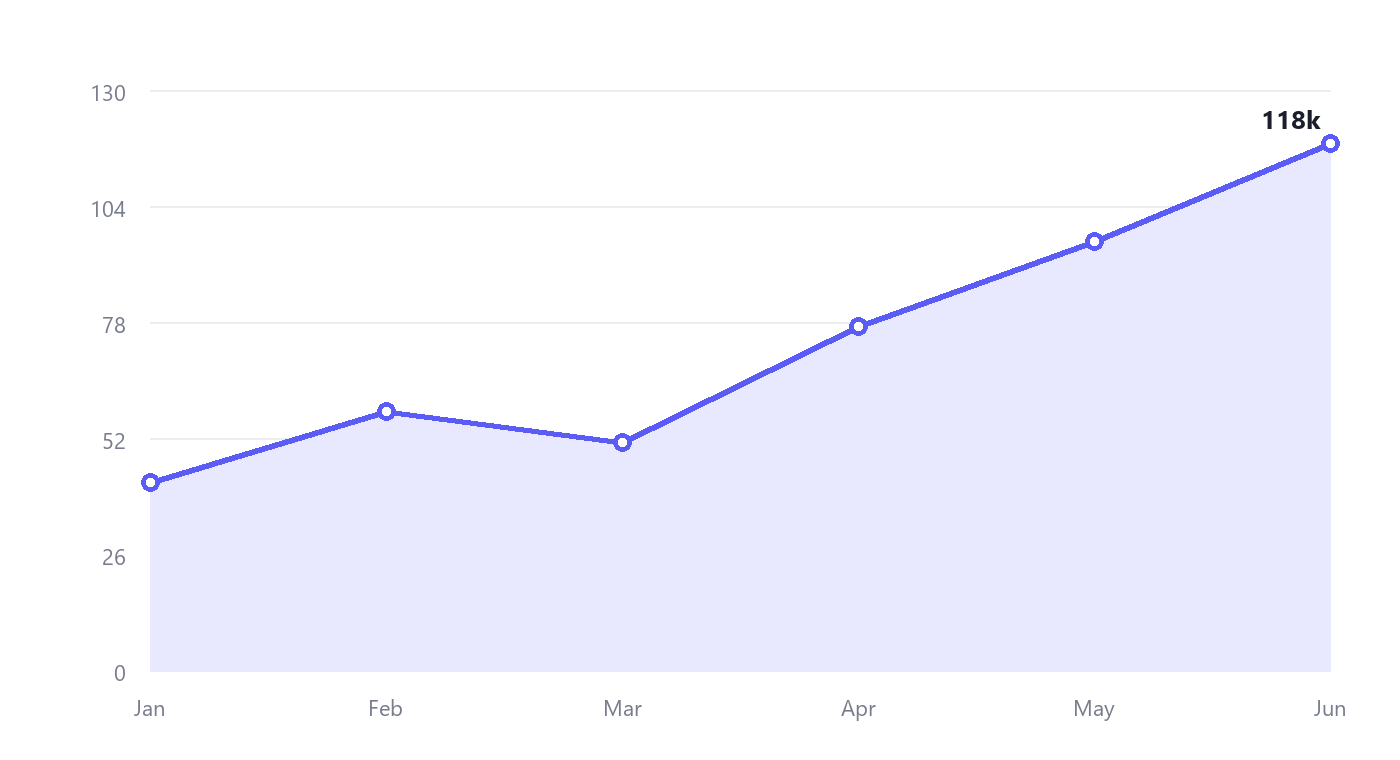
Figure 2. Monthly exports — captioned, DPI-aware and centred.
PNG, JPG, WebP, SVG and more, placed at the size you asked for.
| Metric | Q1 | Q2 |
|---|---|---|
| Revenue | $2.1M | $2.4M |
| Customers | 1,284 | 1,502 |
| NPS | 68 | 72 |
Column widths, alignment, captions and zebra rows — no horizontal overflow.
Try this sample| Region | 2025 | 2026 | ||
|---|---|---|---|---|
| Q1 | Q2 | Q1 | Q2 | |
| North America | 1,240 | 1,318 | 1,402 | 1,511 |
| EMEA | 860 | 904 | 951 | 1,020 |
| APAC | 512 | 548 | 587 | 640 |
Row and column spans, multi-row headers, and headers repeated across pages.
Who it’s for
The same source works for the screen, the printer and the compliance archive.
API references, runbooks and developer guides kept in Git.
Papers, theses and lab reports with formulas, citations and numbered figures.
Course packs, syllabi and reading lists that every student has to be able to open — in print and with a screen reader.
Before you commit
What teams ask before they put a document in front of a client, a reviewer or a regulator.
Read the full FAQKaTeX, LaTeX and Mermaid use the same pipeline as the PDF. KaTeX formulas keep a real text layer; TeX fallback formulas and diagrams stay vector, not screenshots.
Headers repeat, rows stay intact, and the page preview shows the break before you export. Merged headers and wide tables are first-class.
No. Import a public GitHub or GitLab folder with its images and includes, or paste Markdown directly. Source files are read, never rewritten.
Export PDF/A for archiving or PDF/UA for accessibility, run Preflight first, and keep every conversion in an isolated task directory.
Start shipping better documents
Open MarkdownGo, paste your Markdown, and let the page take care of the rest.
No credit card required to try